Escaping the Legacy Infrastructure Trap
Founders and technical directors launching new digital businesses frequently face overwhelming anxiety regarding infrastructure choices. When sinking capital into a new software startup, the last thing an organization needs is an architecture that drains the operational budget or crashes under early traffic. Managing digital assets—specifically resizing, compressing, and formatting media—traditionally required expensive, heavy server-side processing pipelines.
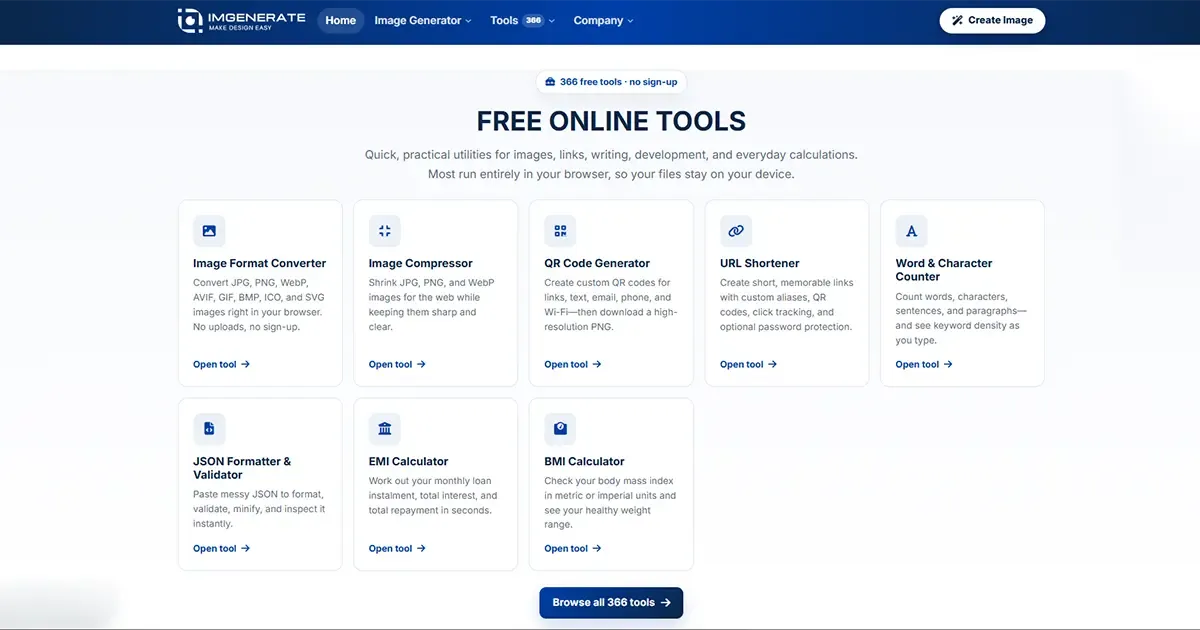
This technical report explores the architecture of an advanced image generator tools web app known as ImGenerate. It examines how shifting computational heavy lifting directly to the browser solves critical pain points regarding data privacy, server costs, and processing latency. By utilizing modern web standards, this platform offers a blueprint for high-performance, cost-effective digital environments.
Development History: Forging a Path with PHP, Laravel, and JavaScript
The ImGenerate platform was conceptualized and engineered by a senior full-stack developer based in Dhaka, Bangladesh, as a flagship demonstration of modern web capabilities for the NaimBD portfolio. The primary development objective was to create a massive suite of utilities—totaling over 366+ distinct tools—without incurring the exorbitant cloud computing costs typically associated with media manipulation.
The technological foundation relies on a strategic separation of concerns. The backend is powered by PHP 8.3 and the Laravel framework, which orchestrates the application's routing, asset delivery, and API rate limiting. Laravel was selected for its progressive ecosystem, enabling the deployment of a highly scalable, agent-ready architecture that natively handles complex middleware requirements.
However, the true innovation lies in the frontend execution. Rather than relying on backend libraries like ImageMagick, the development history reflects a hard pivot toward vanilla JavaScript and the HTML5 Canvas API. This decision transformed the application from a traditional server-bound monolith into a hyper-fast, client-side processing engine provides further context on why choosing the right architectural stack early prevents costly technical debt.
Core Features of the ImGenerate Platform
The platform hosts an expansive array of utilities designed specifically for developers, marketers, and digital creators. Instead of offering surface-level wrappers for external APIs, each feature executes complex algorithms directly within the user's browser environment.
The Client-Side Image Compressor
Large, unoptimized images are the leading cause of poor Core Web Vitals and slow website performance. The integrated Image Compressor tackles this by shrinking JPG, PNG, and WebP files locally.
The process operates through a precise, step-by-step mechanism:
-
File Ingestion: The browser utilizes the JavaScript
FileReaderAPI to read the file's byte stream locally, without initiating any network requests. -
Pixel Decoding: The compressed image is decoded into raw RGBA pixels, where each pixel occupies four bytes in the browser's memory.
-
Canvas Rendering: The image is painted onto a hidden HTML5 Canvas element configured to the exact intrinsic dimensions of the source file.
-
Re-encoding and Export: The browser's native rendering engine re-encodes the image using the
toBlob()method. For lossy formats, a quality parameter is applied to discard imperceptible visual data, generating a highly optimized file for instant local download.
Precision Image Resizing
The Image Resizer tool grants users pixel-perfect control over their digital assets, offering custom dimensions alongside presets for major social media platforms. When a user adjusts the width or height parameters, the JavaScript logic calculates the new aspect ratio in real-time. The canvas context then redraws the image at the new scale utilizing the browser's hardware-accelerated graphics pipeline. Because this happens locally, users experience zero latency, viewing the exact output instantly before downloading the finalized WebP, PNG, or JPG asset.
Vector-Based Barcode Generation
Beyond raster image manipulation, the platform excels in generating deterministic visual data. The Barcode Generator creates CODE128, EAN-13, and UPC formats entirely through JavaScript mathematics. Rather than rendering a static pixel grid, the algorithm calculates precise bar widths, module spacing, and quiet zones to generate a Scalable Vector Graphic (SVG). This ensures the barcode remains perfectly sharp and scannable regardless of how much it is magnified for print.
SEO and Meta Tag Utilities
Modern digital platforms depend heavily on search engine visibility. The suite includes a Meta Tag & Open Graph Generator that dynamically builds properly formatted HTML tags for Twitter Cards and Facebook sharing. By executing this generation on the client side, marketing professionals can instantly preview and copy the necessary code blocks to embed within their respective <head> sections, ensuring their content displays perfectly across social graphs.
Why Organizations Should Adopt This Architecture
For businesses operating in highly competitive technical sectors, adopting a client-side, Laravel-backed architecture offers distinct, measurable advantages. Traditional server-side image manipulation exposes organizations to significant infrastructure bloat and regulatory risk.
The privacy-first nature of this architecture builds immense user trust. Because the FileReader and Canvas APIs operate strictly within the client's local memory sandbox, sensitive files never traverse the internet. This inherent structural safeguard ensures immediate compliance with strict data protection frameworks, shielding the organization from potential breaches.
Furthermore, operational costs are drastically reduced. A traditional infrastructure requires scaling robust virtual machines to handle concurrent image manipulations during traffic spikes. Conversely, a client-side architecture distributes the processing load entirely to the end-users' devices, allowing the Laravel backend to function simply as an ultra-efficient asset delivery mechanism.
| Architectural Component | Client-Side Architecture (ImGenerate Model) | Traditional Server-Side Architecture |
| Data Privacy Compliance | Absolute. Files never leave the local device; zero risk of server interception. | High Risk. Requires uploads to remote servers and strict data lifecycle management. |
| Compute Infrastructure Costs | Near Zero. The user's device CPU/GPU handles all mathematical processing. | Extremely High. Requires elastic scaling of virtual machines to process media concurrently. |
| Processing Latency | Instantaneous. Execution occurs in milliseconds without network bottlenecks. | Slow. Heavily dependent on network upload speeds and server queue congestion. |
| Core Web Vitals Impact | Excellent. Minimizes server response times and optimizes Largest Contentful Paint (LCP). | Poor. Network delays negatively impact Time to First Byte (TTFB) and overall rendering. |
The Golden Rule: Never block the main execution thread when manipulating heavy media files in the browser. Developers must offload intensive pixel calculations to a background Web Worker utilizing the
OffscreenCanvasAPI. This critical technique ensures the user interface remains fluid and responsive, protecting the application's Interaction to Next Paint (INP) scores from severe degradation.
Conclusion and Strategic Next Steps
The convergence of Laravel's backend stability with JavaScript's client-side processing power has fundamentally redefined the parameters of web development. By deliberately offloading resource-heavy tasks to the local browser, modern platforms can achieve unprecedented execution speeds, guarantee absolute user privacy, and reduce cloud computing operational costs to near zero. This sophisticated architectural approach delights end-users with instant results while simultaneously future-proofing the business against enterprise scaling challenges.
Organizations seeking to modernize their digital infrastructure, launch a robust software product, or dramatically improve their Core Web Vitals should not navigate these technical waters alone. Decision-makers are strongly encouraged to consult a professional web developer immediately for a comprehensive architectural evaluation. Leveraging expert guidance ensures the transformation of sluggish, legacy systems into blazing-fast, market-leading applications.
External References
-
MDN Web Docs: The HTML5 Canvas API – Comprehensive documentation on client-side graphics rendering and pixel manipulation techniques. (https://developer.mozilla.org/en-US/docs/Web/API/Canvas_API)
-
Google web.dev: Core Web Vitals – Authoritative guidelines on measuring and optimizing Largest Contentful Paint (LCP) and Interaction to Next Paint (INP). (https://web.dev/articles/vitals)
-
Laravel Official Documentation – Detailed insights into progressive framework architecture, backend routing, and performance optimization. (https://laravel.com/docs)